前言
如何通过Coidng Service ook 实现CiCd
实现方法
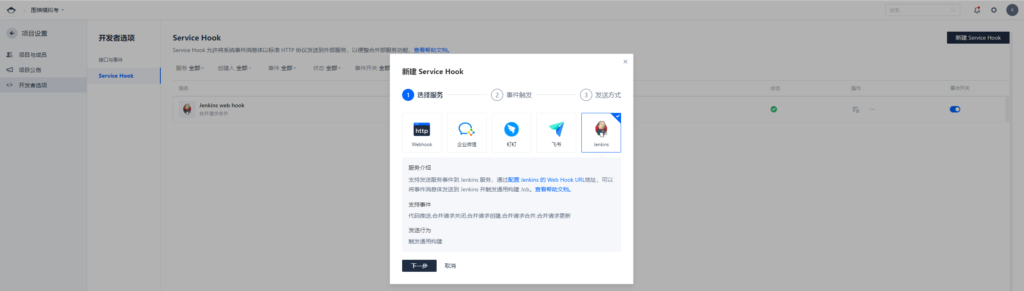
1,Coding 创建新的Service Hook 类型为Jenkins
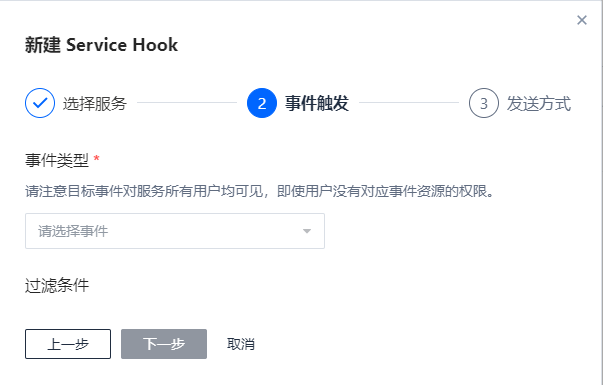
2,选择触发的事件类型
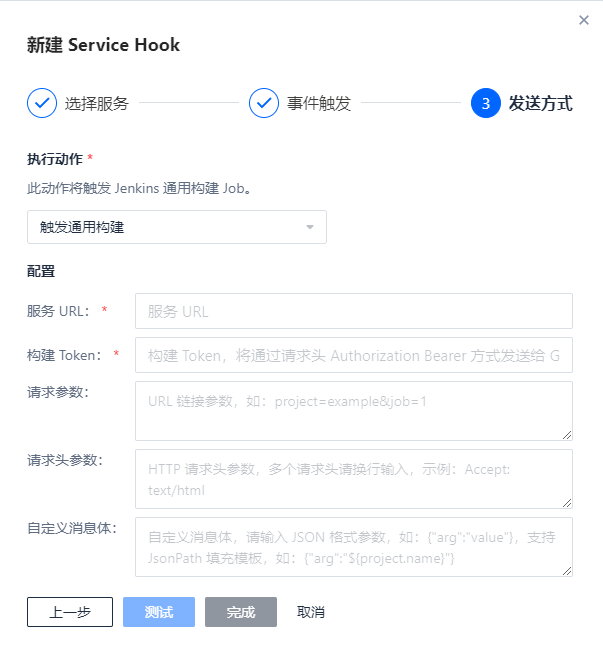
3,选择发送方式
1
2
3
4
5
6
7
8
9
10
11
12
13
| url http:
token #定义在job中的token值 jenkins 根据这个值来区分不同的job
#自定义请求体,jenkins从里面取到构建参数
请求参数和请求头参数不填写
{
"url" : "${project.url}",
"name" : "${project.display_name}",
"Project_name" : "${project.name}",
"date" : " ${mergeRequest.created_at}",
"title" :"${mergeRequest.title}" ,
"body" : "${mergeRequest.body}",
}
|
4,jenkins 配置
Jenkins 安装 Generic-webhook-trigger 插件 方法不多赘述
jenkins接受hook传递来的参数 拉取对应分支的代码进行编译打包,构建成为镜像push, genericVariables 里面定义的变量,接收hook传递过来我们自定义的消息体,利用这些消息去构建镜像,或者拉取对应的分支代码
Jenkins Pipeline
1
2
3
4
5
6
7
8
9
10
11
12
13
14
15
16
17
18
19
20
21
22
23
24
25
26
27
28
29
30
31
32
33
34
35
36
37
38
39
40
41
42
43
44
45
46
47
48
49
50
51
52
53
54
55
56
57
58
59
60
61
62
63
64
65
66
67
68
69
70
71
72
73
74
75
76
77
78
79
80
81
82
83
84
85
86
87
88
89
90
91
92
93
94
95
96
97
98
99
100
101
102
103
104
105
106
107
108
109
110
111
112
113
114
115
116
117
118
119
120
121
122
123
124
125
126
127
128
| pipeline {
agent any
triggers {
GenericTrigger(
genericVariables: [
[key: 'Url', value: '$.url'],
[key: 'Name', value: '$.name'],
[key: 'Project_name', value: '$.Project_name'],
[key: 'Date', value: '$.date'],
[key: 'Title', value: '$.title'],
[key: 'App', value: '$.body'],
],
causeString: 'Triggered on $ref',
token: 'Mock',
printContributedVariables: true,
printPostContent: true
)
}
options {
buildDiscarder(logRotator(numToKeepStr: '10'))
timeout(time: 1, unit: 'HOURS')
}
stages {
stage ('base') {
steps {
script {
load "/opt/Groovy/BuildEnv.groovy"
if (!(env.credentialsId && env.registry )) {
error "You need to set env by BuildEnv.groovy."
}
try {
println "项目地址: ${Url}"
println "当前工程: ${Name}"
println "Project: ${Project_name}"
println "本次更新App: ${App}"
println "提交时间: ${Date}"
println "本次更新版本 ${Title}"
} catch (Exception err) {
println "提交参数缺失,请检查后重新提交~"
currentBuild.result = 'FAILURE'
}
}
}
}
stage ('CheckOut') {
steps {
checkout(
[$class: 'GitSCM',
branches: [[name: 'release']],
doGenerateSubmoduleConfigurations: false,
extensions: [],
submoduleCfg: [],
userRemoteConfigs: [[
url: 'git@e.coding.net:ninestar/mock/mock-server.git'
]]]
)
}
}
stage ('Test') {
steps {
script {
withMaven(jdk: 'jdk', maven: 'MAVEN') {
sh ' mvn clean package '
}
}
}
}
stage('Example Deploy') {
when {
anyOf {
environment name: 'App', value: 'mock-backstage'
environment name: 'App', value: 'mock-frontdesk'
}
}
steps {
script {
dir ("${App}") {
docker.withRegistry(env.httpRegistry, env.credentialsId) {
def image = docker.build("${env.registry}${env.MockNs}${App}:${Title}")
image.push()
}
}
}
}
}
stage ('BuildImagesAll') {
when {
environment name: 'App', value: 'all'
}
steps {
script {
for ( item in env.MockApp.tokenize(',') ) {
dir ("${item}") {
docker.withRegistry(env.httpRegistry, env.credentialsId) {
def image = docker.build("${env.registry}${env.MockNs}${item}:${Title}")
image.push()
}
}
}
}
}
}
stage ('CleanWorkspace') {
steps {
cleanWs()
println 'Success'
}
}
}
}
|
1
2
3
4
5
6
7
8
9
10
11
12
13
14
15
16
17
18
19
20
21
| pipeline {
agent any
parameters {
imageTag(name: 'Docker_Image', description: '',
image: 'lixiansen/front', filter: '.*', defaultTag: '',
registry: 'https://registry.cn-shanghai.aliyuncs.com/', credentialId: 'ali_acr', tagOrder: 'NATURAL')
}
stages {
stage('Deploy') {
steps {
script {
println "当前更新镜像版本为: ${Docker_Image}"
println "开始更新"
sh label: '', script: "kubectl --kubeconfig /root/kube-config/mock/config set image deploy/front mock-frontdesk=registry.cn-shanghai.aliyuncs.com/${Docker_Image} -n *** --record"
}
}
}
}
}
|